
Remote monitoring and management for MSPs
Patch, watch and map every client from one calm console.
RabbitRMM brings endpoints and networks together: patches that roll out in rings and stop themselves at the first sign of trouble, alerts that open their own tickets, remote access in a click, and a live map of every switch, firewall and access point you manage.
October cumulative update
Critical Backup failing
OAK-FS01: no successful backup for 30 hours.
Ticket #41877 opened in your PSA with an AI summary and a suggested fix. Resolves itself when the next backup succeeds.
Connects to the tools your team already runs
One platform, fewer tabs
Everything a technician reaches for, already connected.
An RMM, a patch tool, a network monitor, a script library and a compliance spreadsheet usually live in five places. In RabbitRMM they share one fleet, one set of clients and one permission model, so what you learn in one view is already true in the next.
Patching that protects itself
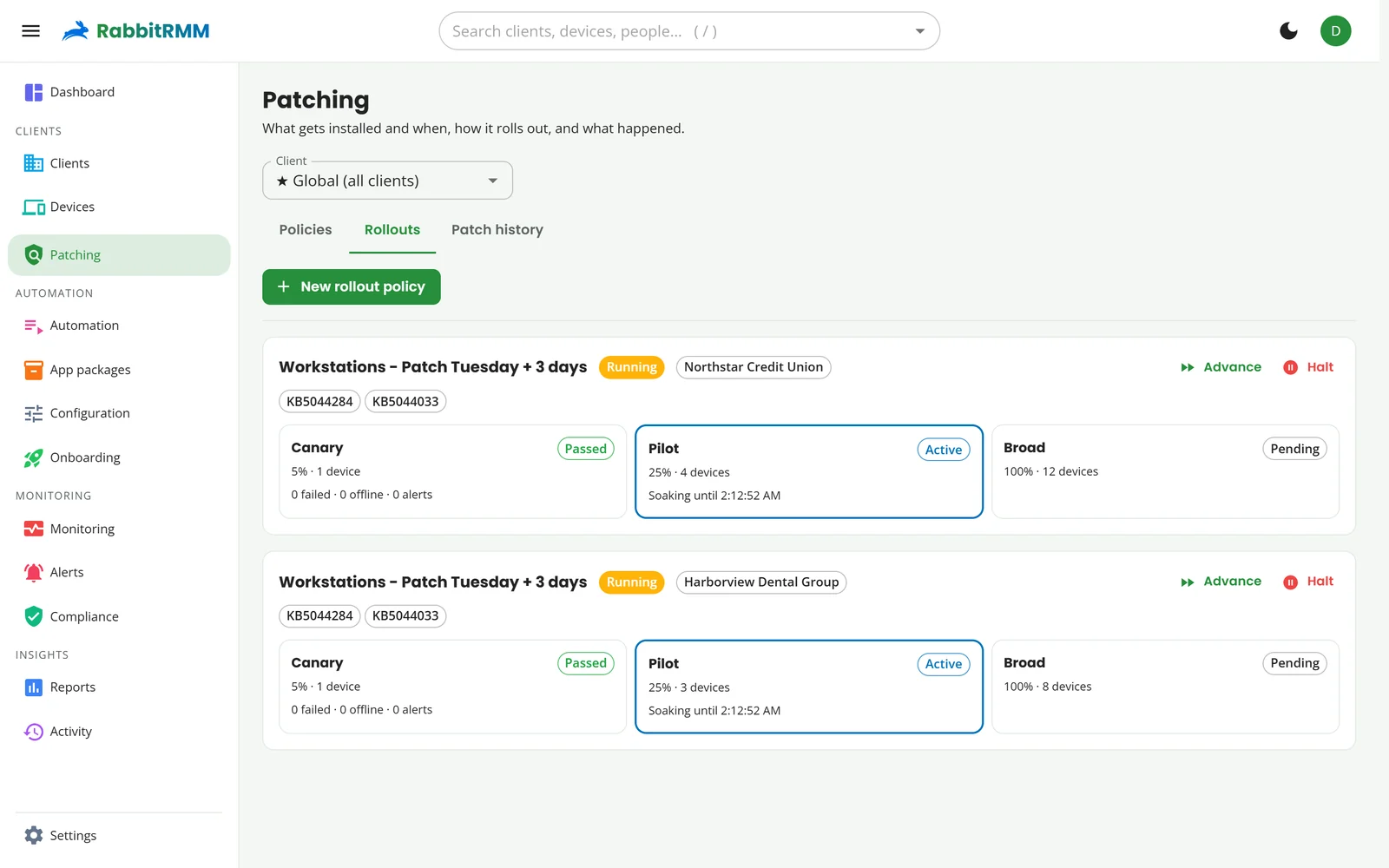
Policies roll out in canary, pilot and broad rings with health gates between them. A bad update halts the rollout and blocks itself before it reaches everyone.
Monitoring that files the ticket
CPU, disk, services, event logs, apps, backups and hardware health. Alerts open PSA tickets, attach an AI summary and close themselves when the problem clears.
A network map that draws itself
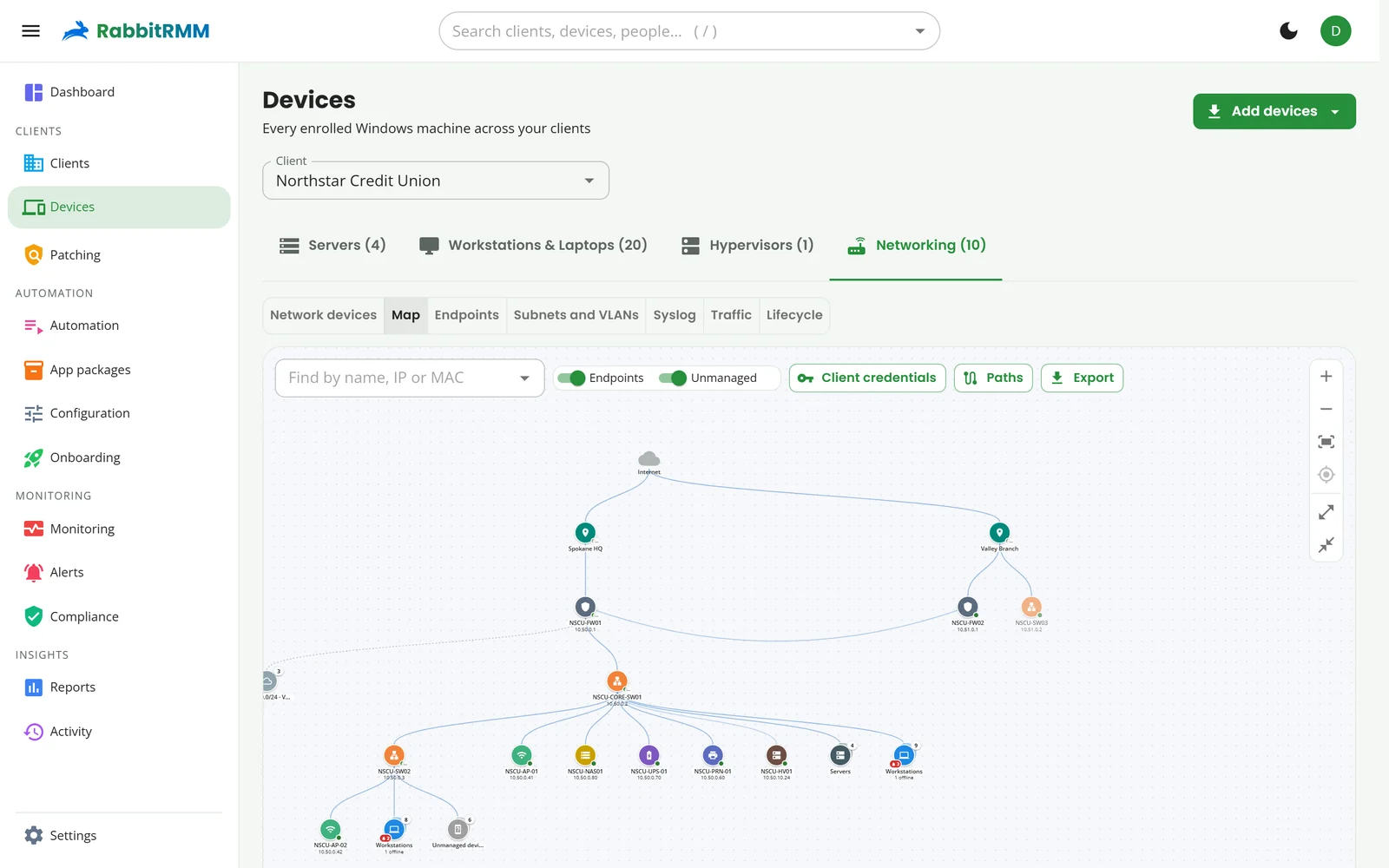
An agent on the LAN discovers switches, firewalls, access points, printers and UPSes, reads LLDP and builds a living topology with subnets, VLANs and every endpoint.
Remote access, built in
Remote desktop across every monitor and Windows session, a real PowerShell or CMD terminal, file transfer, registry, services and processes. No third-party remote tool.
Automation without the busywork
A script library with variables and custom fields, workflows triggered by alerts or drift, 371 one-click apps and configuration profiles that keep machines the way you set them.
Compliance from live data
CIS Controls, Essential Eight, HIPAA and NIST CSF scored per client from what the fleet actually reports, with evidence you can export. No questionnaires.
See it working
Real screens, not mock-ups.
Every image on this site is RabbitRMM running on a demo book of business. Pick a part of the day.
Everything about a machine, one click from the list.
Hardware, warranty, the switch port it is plugged into, who logged on last, its resource history, vulnerabilities, apps and patches. The ribbon across the top runs the tools: remote desktop, PowerShell, files, registry, services, patch now, wake, deploy an app or run a job.
How devices workRollouts you can watch, advance or halt.
Each client's rollout shows which ring is patching, which is soaking and how healthy each ring came out. Advance a ring early, halt everything, or let the health gates decide.
Ring-based patchingClick a switch, see what hangs off it.
The map is built from LLDP, ARP and forwarding tables. Select any device for its health, ports and endpoints, or open Paths to trace how two machines reach each other.
Network monitoringStart the day with what changed.
The dashboard counts what needs you, and every number is a door: click "Need updates" and you are looking at exactly those devices, already filtered.
The dashboardRing-based patching
A bad update stops at five percent.
Most patch tools push to everyone at once and hope. RabbitRMM sends updates to a canary ring first, lets it soak, checks for failures, devices that went offline and new alerts, and only then moves on.
- Canary, pilot and broad rings with your own percentages and soak times
- Auto-halt on failures or offline devices, and auto-block the update that caused it
- Roll a KB back across a whole client from the catalog in one action
- Let end users pick their own patch time from the pre-stage email
- Maintenance windows in the client's time zone, with run-if-missed
Network
Your RMM finally sees the network.
Any agent can be the client's network collector. It sweeps subnets, polls SNMP, reads LLDP, ARP and forwarding tables, listens for syslog and NetFlow, and backs up switch and firewall configs over SSH.
AI operations
An assistant that drafts, a human that decides.
Connect Claude, OpenAI or your own Azure OpenAI deployment. RabbitRMM uses it where it saves real time, and never lets it act alone.
- Summarise and correlate alerts, and suggest the likely fix
- Draft the PSA ticket with what was checked and what to try
- Write a PowerShell script from a plain-English description
- Build a report or an automation by describing it
- Propose remediation that runs only after a technician approves it
- Per-user monthly spend limits, with every call metered
Built for how MSPs work
Many clients. One set of rules.
Roles scoped to clients
Give a technician three clients and the patching permission, and that is all they see.
Microsoft 365 by GDAP
Import clients and their people, see MFA status per user, and spot accounts nobody has used in 90 days.
White-label
Your name and logo on the portal, the agent's tray app, the support form, emails and PDF reports.
Every action logged
Who patched, ran, connected to or changed what, and when. Filterable per client and exportable.
See your own clients in RabbitRMM.
A 30-minute walkthrough on a fleet like yours, then a pilot on a handful of your own machines.